PROJETO STACK
Apex - JSON Formatter & Viewer
Apex - JSON Formatter & Viewer
Couldn't load pickup availability
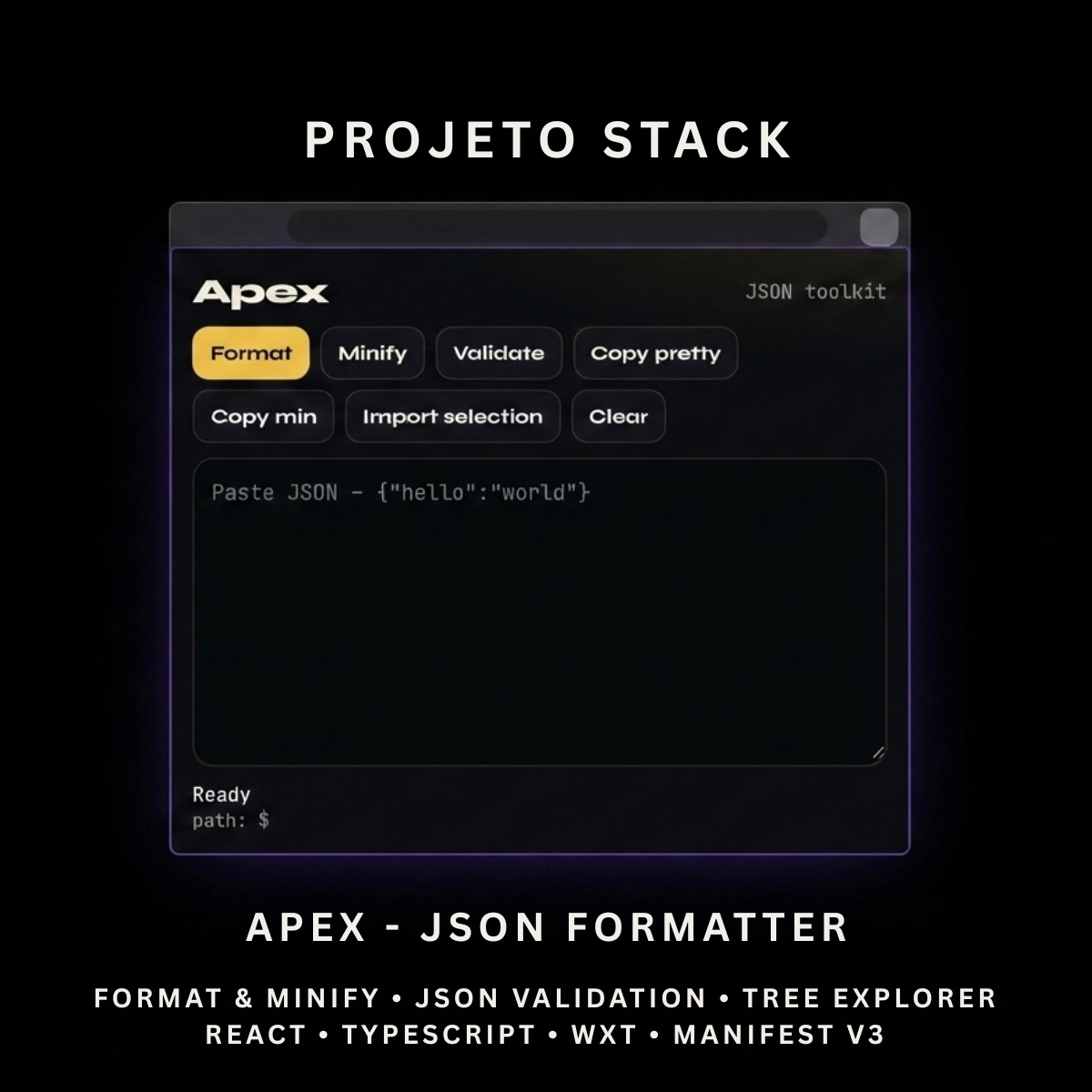
Format, validate, minify, and explore JSON from one clean browser extension.
Apex is a React and TypeScript JSON toolkit featuring automatic validation, readable formatting, compact minification, a collapsible tree viewer, JSONPath copying, selected-text import, and local document storage. It provides a polished source-code foundation for developer tools, data utilities, API workflows, and client extension projects.
Perfect For
✓ Frontend Developers
✓ Backend Developers
✓ API Developers
✓ Software Engineers
✓ QA Testers
✓ Data Analysts
✓ Technical Support Teams
✓ Developer Productivity Tools
✓ Internal Business Applications
✓ Agency Client Projects
Why Choose Apex?
✓ Format JSON instantly
✓ Minify JSON for compact output
✓ Validate JSON automatically
✓ Display useful parsing errors
✓ Explore nested data in a tree view
✓ Copy JSONPaths with one click
✓ Import selected webpage text
✓ Save the latest document locally
✓ No external processing server
✓ Lightweight browser permissions
✓ Clean and organised source code
✓ Easy to customise and extend
✓ No recurring subscription fees
What’s Included
Your download includes:
📦 Complete React & TypeScript Source Code
📦 Chrome Manifest V3 Production Build
📦 Microsoft Edge-Compatible Build
📦 JSON Editor Interface
📦 JSON Formatter
📦 JSON Minifier
📦 JSON Validator
📦 Parsing Error Display
📦 Line & Column Error Calculation
📦 Collapsible JSON Tree Viewer
📦 JSONPath Generator
📦 JSONPath Copying
📦 Selected Text Import
📦 Clipboard Copy Actions
📦 Local Document Persistence
📦 Oversized Document Warning
📦 Background Service Worker
📦 Runtime Selection Script
📦 Extension Icons & Assets
📦 WXT Configuration
📦 TypeScript Configuration
📦 Package Configuration
📄 Documentation (README.md)
Key Features
✓ JSON Formatting
✓ JSON Minification
✓ Automatic JSON Validation
✓ Manual Validation Action
✓ Parsing Error Messages
✓ Line and Column Error Details
✓ Copy Formatted JSON
✓ Copy Minified JSON
✓ Import Selected Webpage Text
✓ Collapsible Object Tree
✓ Collapsible Array Tree
✓ Object Property Counts
✓ Array Item Counts
✓ String Value Display
✓ Number Value Display
✓ Boolean Value Display
✓ Null Value Display
✓ Click-to-Copy JSONPath
✓ Safe Paths for Special Property Names
✓ Local Browser Storage
✓ Automatic Document Persistence
✓ 200,000-Character Storage Limit
✓ Oversized Document Warning
✓ Clear Editor Action
✓ Clipboard Failure Handling
✓ Lightweight Manifest V3 Permissions
Technology Stack
Built using modern browser-extension technologies:
✓ React 19
✓ TypeScript
✓ WXT
✓ Manifest V3
✓ Browser Storage API
✓ Browser Scripting API
✓ Browser Tabs API
✓ Clipboard API
✓ Runtime Messaging
✓ Native JSON Parsing
✓ Component-Based Architecture
✓ Modern CSS
✓ Modern Folder Structure
Performance Features
Designed for fast JSON-processing workflows:
✓ Local JSON Processing
✓ No External API Requests
✓ No Remote Processing Server
✓ Automatic Validation
✓ Debounced Local Persistence
✓ Maximum Saved Document Limit
✓ No Silent Document Truncation
✓ Lightweight Popup Interface
✓ Runtime-Only Page Script Injection
✓ Efficient Recursive Tree Rendering
✓ Reusable React Components
✓ Clean TypeScript Implementation
✓ Modern Manifest V3 Architecture
✓ Easy Branding Customisation
✓ Scalable Source-Code Structure
How It Works
- Download and extract the project files.
- Install the project dependencies.
- Run the development environment or generate a production build.
- Load the generated extension folder into your browser.
- Open Apex from the browser toolbar.
- Paste JSON into the editor or import selected text from a webpage.
- Format, minify, or validate the JSON.
- Explore valid data using the collapsible tree viewer.
- Click any tree node to copy its JSONPath.
- Customise the branding, interface, icons, storage limit, and functionality.
- Build and publish the completed extension when ready.
Browser Compatibility
Works with:
✓ Google Chrome
✓ Microsoft Edge
✓ Brave
✓ Opera
Compatibility with other Chromium-based browsers may be possible but should be tested before production use.
License
Your purchase includes:
✓ Lifetime access to the purchased source code
✓ Commercial use for personal and client projects
✓ Full customisation rights
✓ Unlimited personal and client projects
You may not:
✗ Resell the original source code
✗ Redistribute the files
✗ Share the files publicly
✗ Repackage the source code as a competing digital product for resale
Instant Digital Download
No physical product will be shipped.
Immediately after purchase, you’ll receive instant access to download the complete JSON-toolkit source code, production build, and documentation so you can begin creating your own browser developer tool.
Important Note
Apex processes JSON locally inside the browser.
The most recent document is saved locally only when it contains no more than 200,000 characters. Larger documents remain available during the current popup session but are not saved for the next session.
Exact line and column error details depend on the parsing information returned by the user’s browser.
Apex does not include:
✗ Cloud Document Storage
✗ User Accounts
✗ Remote JSON Processing
✗ API Testing Tools
✗ JSON Schema Validation
✗ Browser Marketplace Publication
PROJETO STACK - Premium software templates and digital products built for modern businesses.
Share