PROJETO STACK
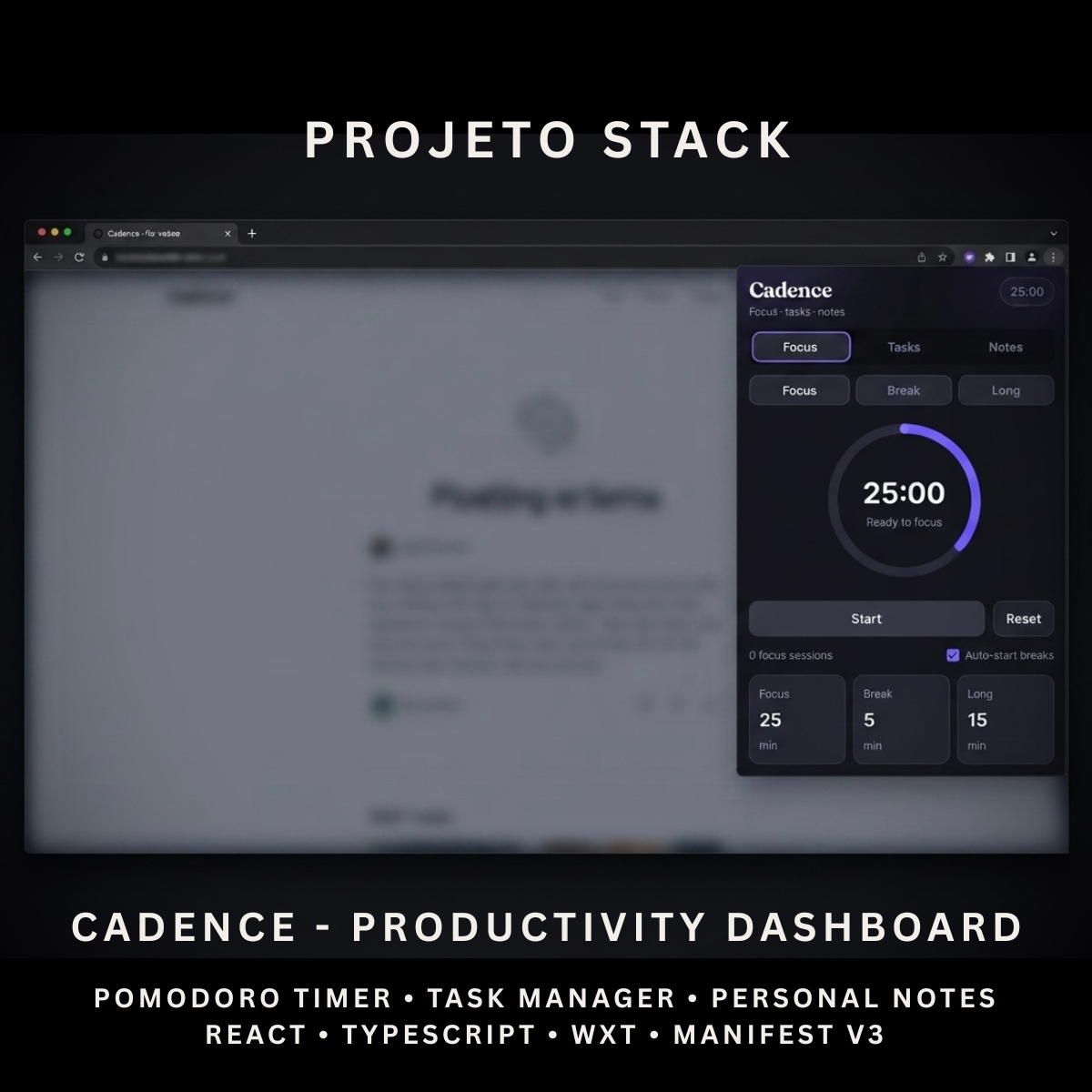
Cadence - Productivity Dashboard
Cadence - Productivity Dashboard
Couldn't load pickup availability
Manage focus sessions, daily tasks, and personal notes from one clean browser dashboard.
Cadence is a React and TypeScript productivity extension featuring a reliable Pomodoro timer, task management, multi-note editing, local storage, browser alarms, and session notifications. It provides a complete source-code foundation for productivity tools, focus applications, internal utilities, and client extension projects.
Perfect For
✓ Productivity Applications
✓ Pomodoro & Focus Tools
✓ Task Management Products
✓ Note-Taking Utilities
✓ Students
✓ Remote Workers
✓ Freelancers
✓ Startup Products
✓ Internal Business Tools
✓ Agency Client Projects
Why Choose Cadence?
✓ Focus, tasks, and notes in one extension
✓ Reliable timer that continues when the popup closes
✓ Focus, short-break, and long-break modes
✓ Customisable timer durations
✓ Browser session notifications
✓ Local task and note storage
✓ Multiple-note management
✓ Clean dark-mode interface
✓ Minimal browser permissions
✓ No external database required
✓ Complete editable source code
✓ Easy to customise and extend
✓ No recurring subscription fees
What’s Included
Your download includes:
📦 Complete React & TypeScript Source Code
📦 Chrome Manifest V3 Production Build
📦 Microsoft Edge-Compatible Build
📦 Productivity Dashboard Popup
📦 Pomodoro Focus Timer
📦 Short-Break Timer
📦 Long-Break Timer
📦 Circular Progress Indicator
📦 Timer Start, Pause, Resume & Reset Controls
📦 Custom Duration Settings
📦 Automatic Break Starting
📦 Completed Session Counter
📦 Browser Alarm System
📦 Session Notifications
📦 Task Management Panel
📦 Notes Management Panel
📦 Local Storage System
📦 Background Service Worker
📦 Extension Icons & Assets
📦 WXT Configuration
📦 TypeScript Configuration
📦 Package Configuration
📄 Documentation (README.md)
Key Features
✓ Pomodoro Focus Timer
✓ Focus Mode
✓ Short-Break Mode
✓ Long-Break Mode
✓ Start Timer
✓ Pause Timer
✓ Resume Timer
✓ Reset Timer
✓ Custom Focus Duration
✓ Custom Short-Break Duration
✓ Custom Long-Break Duration
✓ Auto-Start Breaks
✓ Completed Focus-Session Counter
✓ Circular Timer Progress
✓ Mini Timer Across Dashboard Sections
✓ Timer Continues When Popup Closes
✓ Timer Recovery After Browser Restart
✓ Browser Session Notifications
✓ Add New Tasks
✓ Mark Tasks as Complete
✓ Reopen Completed Tasks
✓ Delete Individual Tasks
✓ Clear Completed Tasks
✓ Open Task Count
✓ Completed Task Count
✓ Create Multiple Notes
✓ Edit Existing Notes
✓ Delete Notes
✓ Unsaved-Change Warning
✓ Local Browser Storage
✓ Focus, Tasks & Notes Navigation
Technology Stack
Built using modern browser-extension technologies:
✓ React 19
✓ TypeScript
✓ WXT
✓ Manifest V3
✓ Browser Storage API
✓ Browser Alarms API
✓ Browser Notifications API
✓ Background Service Worker
✓ SVG Progress Rendering
✓ Component-Based Architecture
✓ Modern CSS
✓ Modern Folder Structure
Performance Features
Designed for reliable everyday productivity:
✓ Absolute-Time Timer Calculation
✓ Background Alarm Scheduling
✓ Popup-Independent Timer Operation
✓ Timer Recovery After Browser Restart
✓ Local Productivity Data Storage
✓ No External API Requests
✓ No Remote Database
✓ Lightweight Popup Interface
✓ Real-Time Timer Display
✓ Storage Change Synchronisation
✓ Reusable React Components
✓ Clean TypeScript Implementation
✓ Minimal Extension Permissions
✓ Modern Manifest V3 Architecture
✓ Easy Branding Customisation
✓ Scalable Source-Code Structure
How It Works
- Download and extract the project files.
- Install the project dependencies.
- Run the development environment or generate a production build.
- Load the generated extension folder into your browser.
- Open Cadence from the browser toolbar.
- Choose Focus, Break, or Long Break mode.
- Adjust the session durations when needed.
- Start the timer and continue working after closing the popup.
- Add and complete tasks from the Tasks section.
- Create and edit notes from the Notes section.
- Customise the branding, colours, timer settings, interface, icons, and functionality.
- Build and publish the completed extension when ready.
Browser Compatibility
Works with:
✓ Google Chrome
✓ Microsoft Edge
✓ Brave
✓ Opera
Compatibility with other Chromium-based browsers may be possible but should be tested before production use.
License
Your purchase includes:
✓ Lifetime access to the purchased source code
✓ Commercial use for personal and client projects
✓ Full customisation rights
✓ Unlimited personal and client projects
You may not:
✗ Resell the original source code
✗ Redistribute the files
✗ Share the files publicly
✗ Repackage the source code as a competing digital product for resale
Instant Digital Download
No physical product will be shipped.
Immediately after purchase, you’ll receive instant access to download the complete productivity-dashboard source code, production build, and documentation so you can begin creating your own browser productivity tool.
Important Note
Cadence stores timer settings, tasks, notes, and productivity data locally inside the browser.
Browser notifications must be enabled for session-completion alerts to appear.
The current auto-start option automatically begins breaks after completed focus sessions. It does not automatically begin the next focus session after a break.
Cadence does not include:
✗ Cloud Synchronisation
✗ User Accounts
✗ Team Collaboration
✗ Calendar Integration
✗ Cross-Device Data Synchronisation
✗ Mobile Application
✗ Browser Marketplace Publication
PROJETO STACK - Premium software templates and digital products built for modern businesses.
Share