PROJETO STACK
Caliper - Page Ruler
Caliper - Page Ruler
Couldn't load pickup availability
Measure webpage elements, distances, and custom areas directly inside your browser.
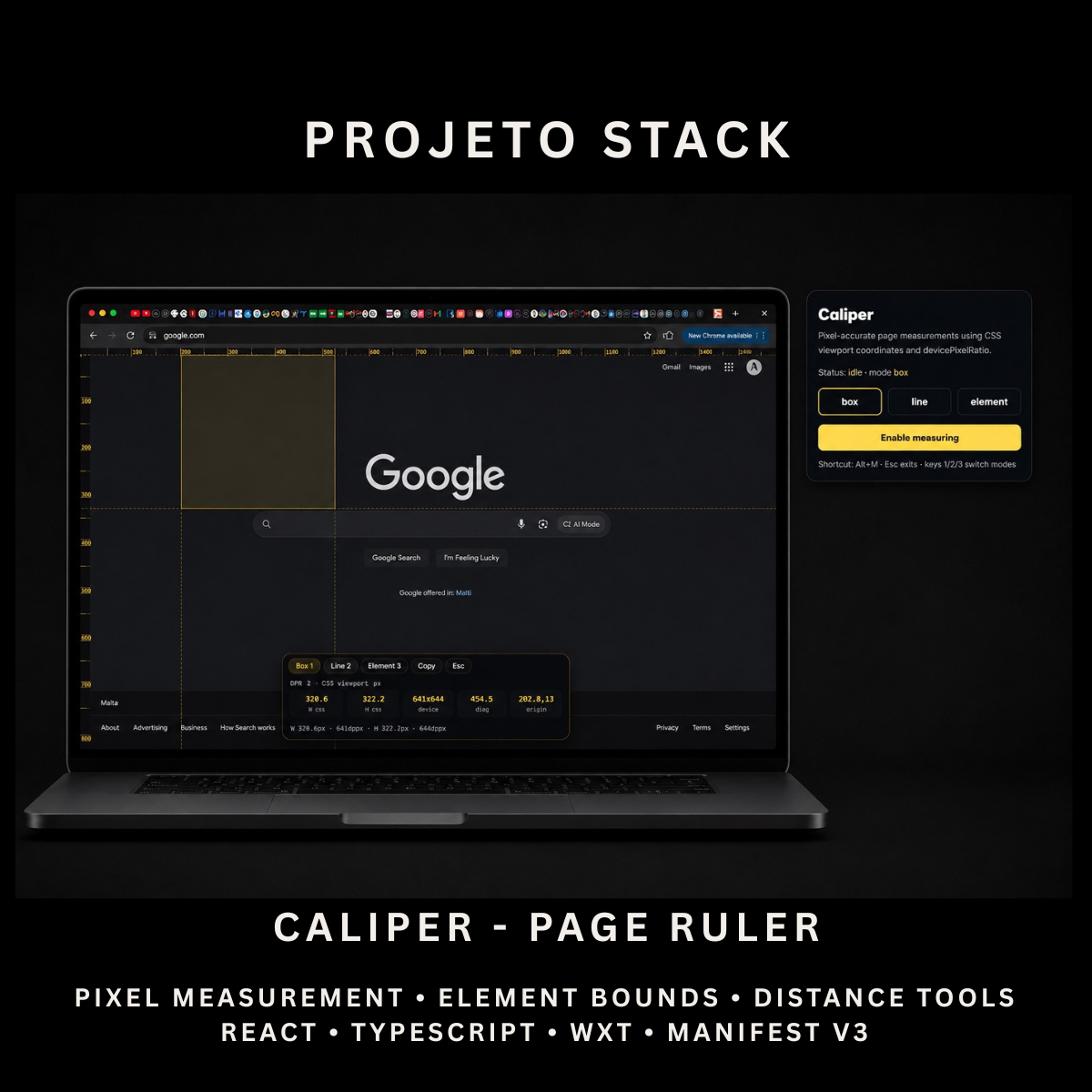
Caliper is a React and TypeScript page-ruler extension featuring box, line, and element measurement modes, CSS and device-pixel values, angle calculations, edge rulers, crosshair guides, and copyable results. It provides a complete source-code foundation for developer tools, design utilities, testing products, and client extension projects.
Perfect For
✓ Web Designers
✓ UI & UX Designers
✓ Frontend Developers
✓ Quality Assurance Teams
✓ Website Auditors
✓ Design Agencies
✓ Browser Productivity Tools
✓ Developer Utilities
✓ Internal Business Applications
✓ Agency Client Projects
Why Choose Caliper?
✓ Measure custom areas directly on webpages
✓ Inspect element width and height
✓ Measure straight-line distances
✓ Calculate horizontal and vertical differences
✓ Display line angles
✓ View CSS and device-pixel values
✓ Use built-in horizontal and vertical rulers
✓ Copy measurement results instantly
✓ Switch modes with keyboard shortcuts
✓ High-DPI canvas rendering
✓ Lightweight browser permissions
✓ Clean and organised source code
✓ Easy to customise and extend
✓ No recurring subscription fees
What’s Included
Your download includes:
📦 Complete React & TypeScript Source Code
📦 Chrome Manifest V3 Production Build
📦 Microsoft Edge-Compatible Build
📦 Page Ruler Popup Interface
📦 On-Page Measurement Overlay
📦 Box Measurement Mode
📦 Line Measurement Mode
📦 Element Measurement Mode
📦 CSS Pixel Calculations
📦 Device Pixel Calculations
📦 Device Pixel Ratio Detection
📦 Width & Height Measurement
📦 Diagonal Measurement
📦 X & Y Origin Coordinates
📦 Horizontal & Vertical Distance Values
📦 Line Angle Calculation
📦 Horizontal Edge Ruler
📦 Vertical Edge Ruler
📦 Measurement Crosshair Guides
📦 On-Page Measurement HUD
📦 Copy Measurement Action
📦 Keyboard Shortcut Controls
📦 Background Service Worker
📦 Runtime Content Script
📦 Geometry Utilities
📦 Extension Icons & Assets
📦 WXT Configuration
📦 TypeScript Configuration
📦 Package Configuration
📄 Documentation (README.md)
Key Features
✓ Box Measurement Mode
✓ Line Measurement Mode
✓ Element Measurement Mode
✓ Drag-to-Measure Interface
✓ Live Width Measurement
✓ Live Height Measurement
✓ Diagonal Measurement
✓ Element Bounding-Box Detection
✓ Line Length Measurement
✓ Horizontal Delta
✓ Vertical Delta
✓ Line Angle Calculation
✓ CSS Pixel Results
✓ Device Pixel Results
✓ Device Pixel Ratio Display
✓ Measurement Origin Coordinates
✓ Horizontal Edge Ruler
✓ Vertical Edge Ruler
✓ Fifty-Pixel Ruler Markers
✓ One-Hundred-Pixel Major Markers
✓ Crosshair Measurement Guides
✓ High-DPI Canvas Scaling
✓ Copy Measurement Results
✓ On-Page Control Panel
✓ Keyboard Mode Switching
✓ Keyboard Extension Toggle
✓ Escape-to-Close Action
✓ Runtime Script Injection
✓ Shadow DOM Style Isolation
✓ Responsive Measurement HUD
Technology Stack
Built using modern browser-extension technologies:
✓ React 19
✓ TypeScript
✓ WXT
✓ Manifest V3
✓ Canvas API
✓ Pointer Events API
✓ Clipboard API
✓ Browser Tabs API
✓ Browser Scripting API
✓ Browser Commands API
✓ Shadow DOM
✓ getBoundingClientRect()
✓ Device Pixel Ratio API
✓ Component-Based Architecture
✓ Modern CSS
✓ Modern Folder Structure
Performance Features
Designed for responsive webpage measurements:
✓ Client-Side Measurement Processing
✓ No External API Requests
✓ No Remote Measurement Service
✓ Runtime Content-Script Injection
✓ High-DPI Canvas Rendering
✓ CSS Viewport Coordinate Calculations
✓ Lightweight Overlay Interface
✓ Immediate Measurement Updates
✓ Efficient Pointer Event Handling
✓ Responsive Canvas Resizing
✓ Scroll and Resize Recalculation
✓ Shadow DOM Style Isolation
✓ Reusable TypeScript Utilities
✓ Clean React Implementation
✓ Modern Manifest V3 Architecture
✓ Easy Branding Customisation
✓ Scalable Source-Code Structure
How It Works
- Download and extract the project files.
- Install the project dependencies.
- Run the development environment or generate a production build.
- Load the generated extension folder into your browser.
- Open a standard webpage.
- Open Caliper from the toolbar or press
Alt + M. - Select Box, Line, or Element mode.
- Drag across the page or hover over an element to measure it.
- Review the results in CSS pixels and device pixels.
- Copy the current measurement from the on-page control panel.
- Customise the branding, colours, icons, shortcuts, interface, and functionality.
- Build and publish the completed extension when ready.
Browser Compatibility
Works with:
✓ Google Chrome
✓ Microsoft Edge
✓ Brave
✓ Opera
Compatibility with other Chromium-based browsers may be possible but should be tested before production use.
License
Your purchase includes:
✓ Lifetime access to the purchased source code
✓ Commercial use for personal and client projects
✓ Full customisation rights
✓ Unlimited personal and client projects
You may not:
✗ Resell the original source code
✗ Redistribute the files
✗ Share the files publicly
✗ Repackage the source code as a competing digital product for resale
Instant Digital Download
No physical product will be shipped.
Immediately after purchase, you’ll receive instant access to download the complete page-ruler source code, production build, and documentation so you can begin creating your own browser measurement tool.
Important Note
Caliper measures using browser CSS viewport coordinates.
The displayed device-pixel value is calculated by multiplying the CSS measurement by the current devicePixelRatio. It should not be treated as a physical measurement in centimetres, inches, or real-world screen dimensions.
Element mode measures the rendered element bounds returned by getBoundingClientRect() and does not separately calculate:
✗ Margins
✗ Padding
✗ Border Thickness
✗ Content-Box Dimensions
Caliper may not operate on restricted browser pages such as settings pages, extension marketplaces, internal browser URLs, and some built-in document viewers.
Browser zoom, page transforms, embedded frames, and operating-system scaling may affect how browser coordinates relate to physical display pixels.
PROJETO STACK - Premium software templates and digital products built for modern businesses.
Share