PROJETO STACK
Folio - Reading Mode
Folio - Reading Mode
Couldn't load pickup availability
Turn busy article pages into a clean and focused reading experience.
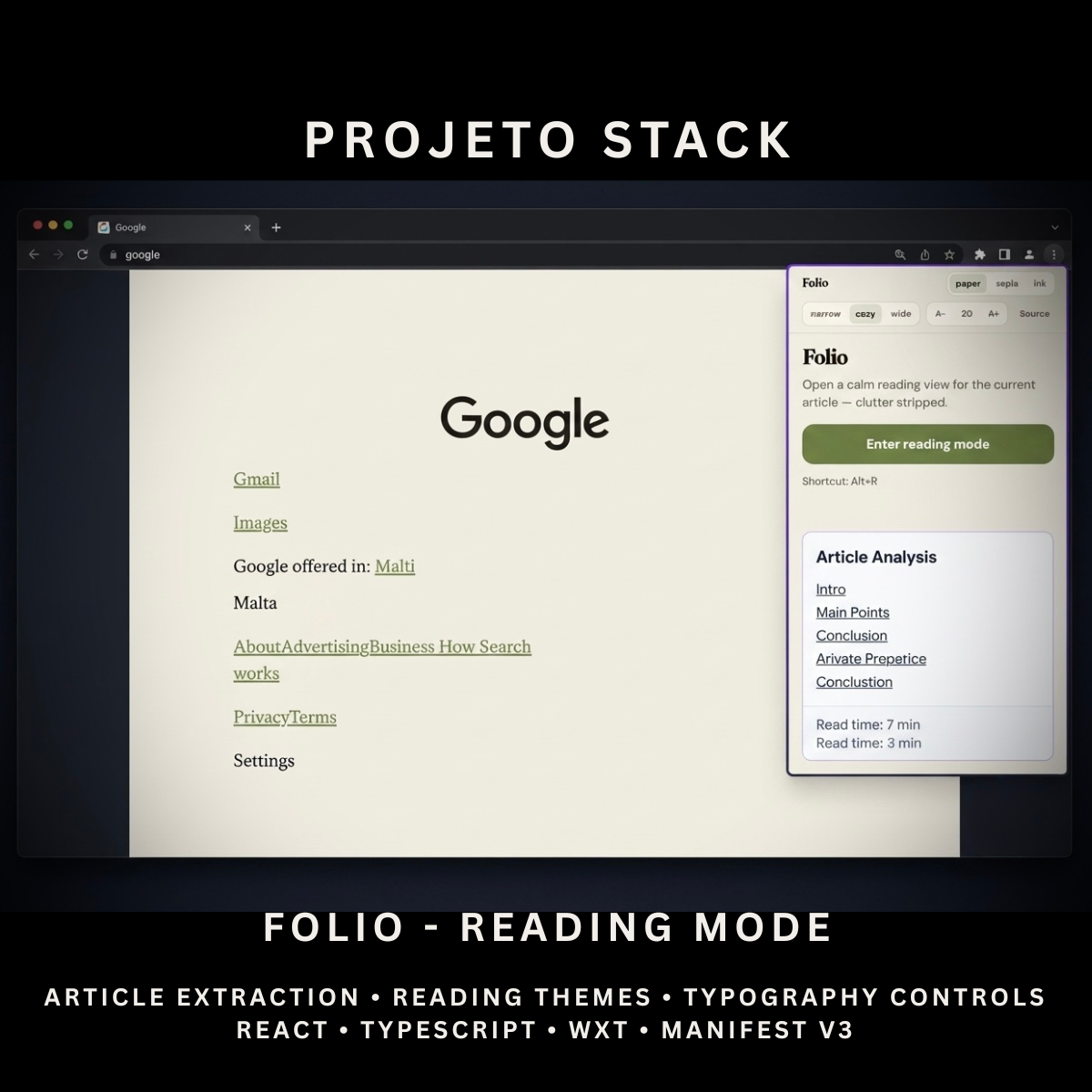
Folio is a React and TypeScript reading-mode extension with article extraction, secure HTML sanitisation, adjustable themes, reading-width controls, font-size settings, and locally stored preferences. It provides a complete source-code foundation for reading tools, accessibility products, research utilities, and client extension projects.
Perfect For
✓ Reading & Productivity Tools
✓ Research Applications
✓ Study Platforms
✓ Accessibility Utilities
✓ Content-Focused Browser Tools
✓ News & Article Readers
✓ Developer Products
✓ Internal Business Applications
✓ Startup Products
✓ Agency Client Projects
Why Choose Folio?
✓ Extract readable article content automatically
✓ Remove distracting webpage elements
✓ Open articles in a dedicated reader tab
✓ Securely sanitise extracted HTML
✓ Choose from three reading themes
✓ Adjust the reading width
✓ Increase or decrease the font size
✓ Save reader preferences locally
✓ Return to the original source page
✓ No external content-processing service
✓ Clean and organised source code
✓ Easy to customise and extend
✓ No recurring subscription fees
What’s Included
Your download includes:
📦 Complete React & TypeScript Source Code
📦 Chrome Manifest V3 Production Build
📦 Reading Mode Popup
📦 Dedicated Reader Page
📦 Article Extraction System
📦 Mozilla Readability Integration
📦 Secure HTML Sanitisation
📦 Article Title Display
📦 Article Byline Display
📦 Article Excerpt Display
📦 Website Name Display
📦 Original Source Link
📦 Paper Theme
📦 Sepia Theme
📦 Ink Dark Theme
📦 Narrow Reading Width
📦 Cozy Reading Width
📦 Wide Reading Width
📦 Font-Size Controls
📦 Local Preference Storage
📦 Temporary Article Storage
📦 Keyboard Shortcut Support
📦 Background Service Worker
📦 Runtime Content Script
📦 Extension Icons & Assets
📦 WXT Configuration
📦 TypeScript Configuration
📦 Package Configuration
📄 Documentation (README.md)
Key Features
✓ Automatic Article Extraction
✓ Mozilla Readability Processing
✓ Dedicated Reader Tab
✓ Secure DOMPurify Sanitisation
✓ Article Title
✓ Article Byline
✓ Article Excerpt
✓ Website Name
✓ Original Source Link
✓ Paper Reading Theme
✓ Sepia Reading Theme
✓ Ink Dark Theme
✓ Narrow Reading Width
✓ Cozy Reading Width
✓ Wide Reading Width
✓ Adjustable Font Size
✓ 16px Minimum Font Size
✓ 28px Maximum Font Size
✓ Local Reader Preferences
✓ Session-Based Article Storage
✓ Local Storage Fallback
✓ Readable Article Detection
✓ No-Article Error Message
✓ Image Support
✓ Picture Element Support
✓ Video Support
✓ Link Support
✓ Heading Support
✓ Code-Block Support
✓ Keyboard Shortcut Support
Technology Stack
Built using modern browser-extension technologies:
✓ React 19
✓ TypeScript
✓ WXT
✓ Manifest V3
✓ Mozilla Readability
✓ DOMPurify
✓ Browser Storage API
✓ Browser Tabs API
✓ Browser Scripting API
✓ Session Storage
✓ Local Storage
✓ Runtime Content Scripts
✓ Component-Based Architecture
✓ Modern CSS
✓ Modern Folder Structure
Performance Features
Designed for focused browser reading:
✓ Local Article Extraction
✓ No External Processing Server
✓ Runtime Content-Script Injection
✓ Temporary Article Storage
✓ Local Preference Persistence
✓ Secure HTML Sanitisation
✓ Lightweight Reader Interface
✓ Responsive Reading Layout
✓ Reusable React Components
✓ Clean TypeScript Implementation
✓ Modern Manifest V3 Architecture
✓ Easy Theme Customisation
✓ Easy Branding Customisation
✓ Scalable Source-Code Structure
How It Works
- Download and extract the project files.
- Install the project dependencies.
- Run the development environment or generate a production build.
- Load the generated extension folder into your browser.
- Open an article-style webpage.
- Open Folio from the browser toolbar or press
Alt + R. - Allow the extension to extract the main article content.
- Read the article in the dedicated reader tab.
- Choose a theme, reading width, and font size.
- Use the source link to return to the original webpage.
- Customise the branding, colours, themes, controls, icons, and functionality.
- Build and publish the completed extension when ready.
Browser Compatibility
Verified for:
✓ Google Chrome
Compatibility with the following may be possible after testing:
✓ Microsoft Edge
✓ Brave
✓ Opera
Firefox and Safari compatibility are not included or verified in the uploaded package.
License
Your purchase includes:
✓ Lifetime access to the purchased source code
✓ Commercial use for personal and client projects
✓ Full customisation rights
✓ Unlimited personal and client projects
You may not:
✗ Resell the original source code
✗ Redistribute the files
✗ Share the files publicly
✗ Repackage the source code as a competing digital product for resale
Instant Digital Download
No physical product will be shipped.
Immediately after purchase, you’ll receive instant access to download the complete reading-mode source code, Chrome production build, and documentation so you can begin creating your own browser reading tool.
Important Note
Folio works best with article-style webpages containing clear headings and readable body content.
It may not extract useful content from:
✗ Application Dashboards
✗ Product Grids
✗ Social Media Feeds
✗ Search Results
✗ Pages With Very Little Readable Text
✗ Restricted Browser Pages
✗ Dynamically Protected Content
Readability extraction and HTML sanitisation may remove or simplify:
✗ Interactive Widgets
✗ Embedded Forms
✗ Scripts
✗ Some Iframe Content
✗ Complex Page Layouts
Folio creates a simplified reading view rather than a complete visual copy of the original webpage.
PROJETO STACK - Premium software templates and digital products built for modern businesses.
Share