PROJETO STACK
Lens - Image Downloader
Lens - Image Downloader
Couldn't load pickup availability
Find, filter, and download images from webpages through one clean browser extension.
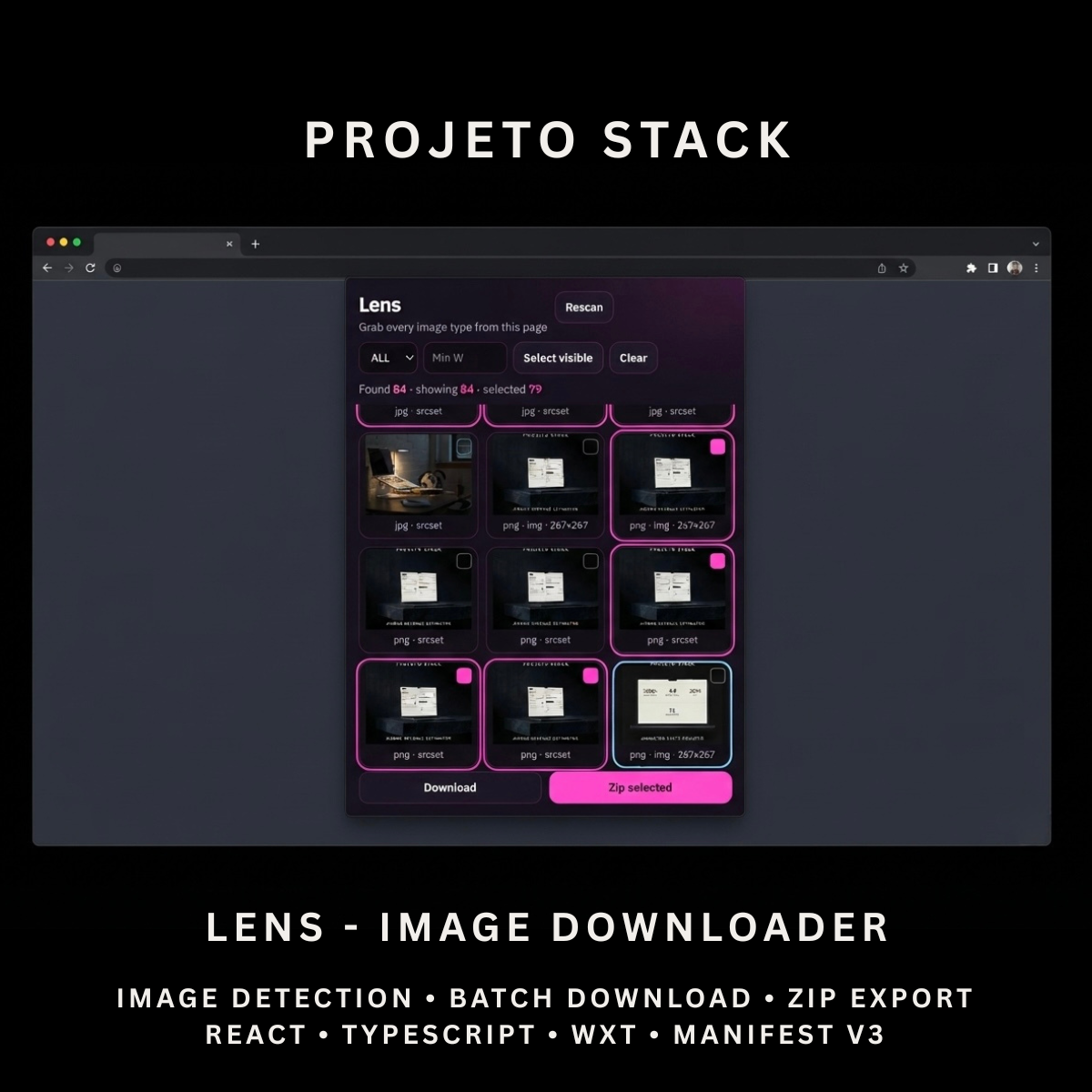
Lens is a React and TypeScript image downloader featuring active-page scanning, multiple image-source detection, image-type filters, individual downloads, and ZIP export. It provides a complete source-code foundation for browser utilities, research tools, content workflows, and client extension projects.
Perfect For
✓ Web Designers
✓ Frontend Developers
✓ Content Creators
✓ Researchers
✓ Marketing Teams
✓ eCommerce Teams
✓ Website Auditing Tools
✓ Media Collection Workflows
✓ Browser Productivity Products
✓ Agency Client Projects
Why Choose Lens?
✓ Scan images from the active webpage
✓ Detect multiple webpage image sources
✓ Download selected images individually
✓ Export selected images in one ZIP archive
✓ Filter images by file type
✓ Filter images by minimum width
✓ Detect CSS background images
✓ Detect lazy-loaded images
✓ Detect SVG and video poster images
✓ Clean visual selection interface
✓ Complete editable source code
✓ Easy to customise and extend
✓ No recurring subscription fees
What’s Included
Your download includes:
📦 Complete React & TypeScript Source Code
📦 Chrome Manifest V3 Production Build
📦 Microsoft Edge-Compatible Build
📦 Image Scanner Popup
📦 Active-Page Image Collection
📦 Standard Image Detection
📦 Srcset Image Detection
📦 Picture Element Detection
📦 CSS Background Image Detection
📦 CSS Mask Image Detection
📦 Lazy-Loaded Image Detection
📦 SVG Image Detection
📦 Inline SVG Conversion
📦 Video Poster Detection
📦 Open Graph Image Detection
📦 Twitter Image Detection
📦 Image-Type Filtering
📦 Minimum-Width Filtering
📦 Individual Image Downloads
📦 ZIP Archive Downloads
📦 Automatic Filename Generation
📦 Duplicate Filename Handling
📦 Background Service Worker
📦 Runtime Content Script
📦 Extension Icons & Assets
📦 WXT Configuration
📦 TypeScript Configuration
📦 Package Configuration
📄 Documentation (README.md)
Key Features
✓ Active Webpage Image Scanning
✓ Automatic Scan When Opened
✓ Manual Rescan
✓ Standard <img> Detection
✓ Current Source Detection
✓ Srcset Detection
✓ Picture Source Detection
✓ CSS Background Image Detection
✓ CSS Mask Image Detection
✓ Lazy-Loading Attribute Detection
✓ SVG Reference Detection
✓ Inline SVG Detection
✓ Video Poster Detection
✓ Open Graph Image Detection
✓ Twitter Image Detection
✓ JPG Support
✓ PNG Support
✓ WebP Support
✓ GIF Support
✓ SVG Support
✓ AVIF Support
✓ BMP Support
✓ ICO Support
✓ TIFF Support
✓ Data Image Support
✓ Other Image-Type Detection
✓ Image-Type Filters
✓ Minimum-Width Filter
✓ Image Preview Grid
✓ Image Source Display
✓ Image Dimension Display
✓ Select Visible Results
✓ Clear Selection
✓ Download Selected Images
✓ ZIP Selected Images
✓ Unique Filename Handling
✓ Empty and Error States
Technology Stack
Built using modern browser-extension technologies:
✓ React 19
✓ TypeScript
✓ WXT
✓ Manifest V3
✓ JSZip
✓ Browser Downloads API
✓ Browser Tabs API
✓ Browser Scripting API
✓ Runtime Messaging
✓ Content Scripts
✓ DOM Image Collection
✓ XML Serializer
✓ Component-Based Architecture
✓ Modern CSS
✓ Modern Folder Structure
Performance Features
Designed for efficient image-discovery workflows:
✓ Runtime Page Scanning
✓ Limited DOM Element Scanning
✓ Duplicate URL Prevention
✓ Lazy Image Loading in the Popup
✓ Client-Side Image Filtering
✓ Local ZIP Archive Creation
✓ Sequential Download Handling
✓ Automatic Filename Generation
✓ Duplicate Filename Protection
✓ Bounded Inline SVG Processing
✓ Responsive Image Grid
✓ Reusable React Components
✓ Clean TypeScript Implementation
✓ Modern Manifest V3 Architecture
✓ Easy Branding Customisation
✓ Scalable Source-Code Structure
How It Works
- Download and extract the project files.
- Install the project dependencies.
- Run the development environment or generate a production build.
- Load the generated extension folder into your browser.
- Open the webpage containing the images you want to inspect.
- Open Lens from the browser toolbar.
- Allow the extension to scan the active webpage.
- Filter the results by image type or minimum width.
- Select the images you want to keep.
- Download them individually or package them into one ZIP archive.
- Customise the branding, interface, filters, icons, and functionality.
- Build and publish the completed extension when ready.
Browser Compatibility
Works with:
✓ Google Chrome
✓ Microsoft Edge
✓ Brave
✓ Opera
Compatibility with other Chromium-based browsers may be possible but should be tested before production use.
License
Your purchase includes:
✓ Lifetime access to the purchased source code
✓ Commercial use for personal and client projects
✓ Full customisation rights
✓ Unlimited personal and client projects
You may not:
✗ Resell the original source code
✗ Redistribute the files
✗ Share the files publicly
✗ Repackage the source code as a competing digital product for resale
Instant Digital Download
No physical product will be shipped.
Immediately after purchase, you’ll receive instant access to download the complete image-downloader source code, production build, and documentation so you can begin creating your own browser image-management tool.
Important Note
Lens discovers images that are available through the active webpage and supported browser access.
Some images may not be downloadable because of:
✗ Website Authentication Requirements
✗ Hotlink Protection
✗ Cross-Origin Restrictions
✗ Expired or Temporary Image URLs
✗ Restricted Browser Pages
✗ Inaccessible Embedded Frames
✗ Website Security Policies
ZIP export attempts to fetch each selected image. Images that cannot be fetched may be skipped.
The minimum-width filter uses detected image dimensions where available. Images without known dimensions may remain visible.
Lens does not include:
✗ Cloud Storage
✗ User Accounts
✗ Remote Image Processing
✗ Website-Crawling Infrastructure
✗ Browser Marketplace Publication
Users are responsible for obtaining permission to download and reuse images from third-party websites.
PROJETO STACK - Premium software templates and digital products built for modern businesses.
Share