PROJETO STACK
Lumen - AI Sidebar Chat
Lumen - AI Sidebar Chat
Couldn't load pickup availability
Add AI assistance directly beside any webpage with a modern and customisable browser sidebar.
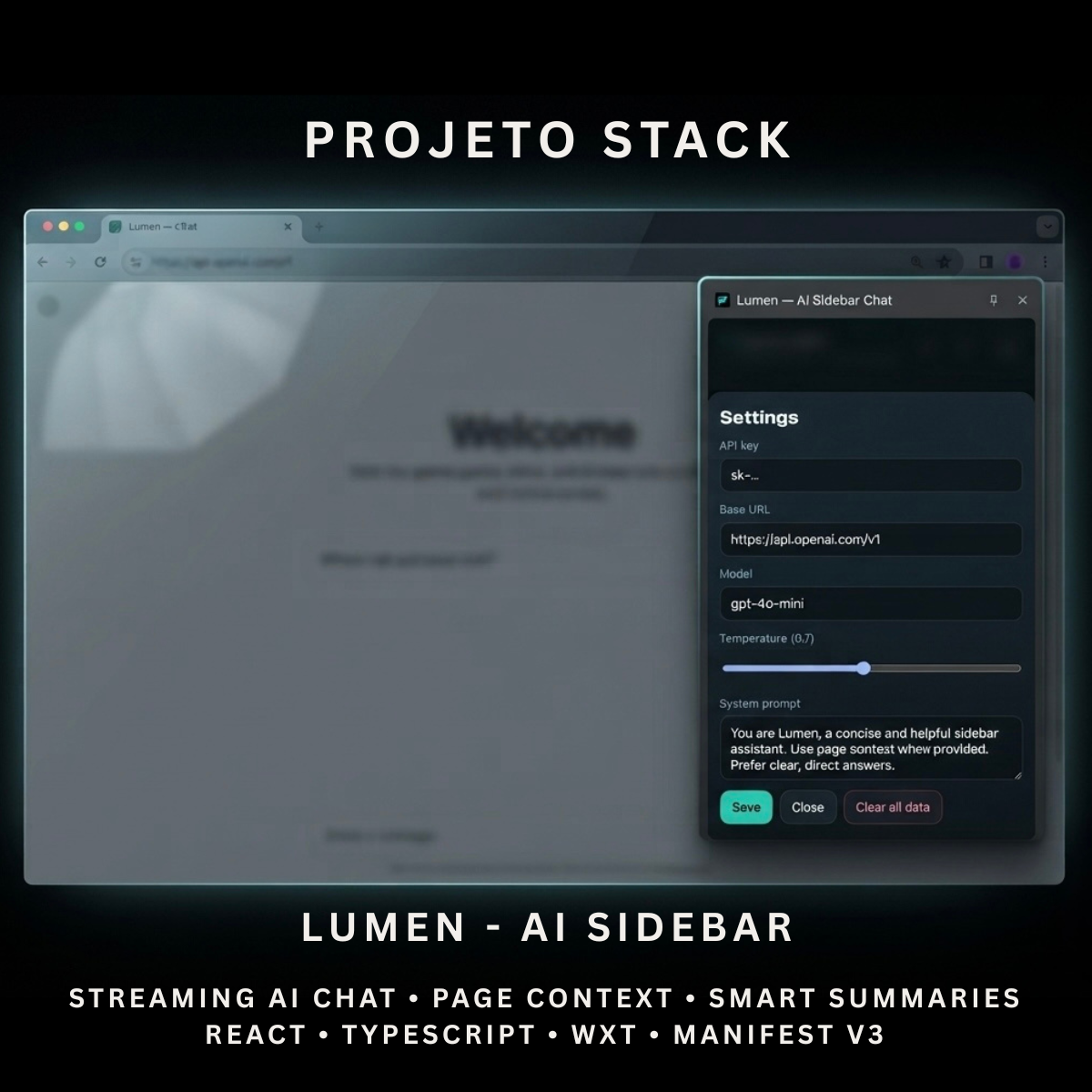
Lumen is a React and TypeScript AI sidebar extension with streaming chat, webpage context, selected-text tools, local conversation history, and configurable OpenAI-compatible API support. It includes builds for Chrome, Microsoft Edge, and Firefox.
Perfect For
✓ AI Productivity Tools
✓ Research Assistants
✓ Study & Learning Tools
✓ Content Writing Tools
✓ Developer Utilities
✓ Browser-Based SaaS Products
✓ Internal Business Applications
✓ Startup Products
✓ Agency Client Projects
✓ OpenAI-Compatible Integrations
Why Choose Lumen?
✓ Modern AI sidebar interface
✓ Streaming AI responses
✓ Bring-your-own API architecture
✓ Current webpage context support
✓ Selected-text context
✓ Built-in quick actions
✓ Local conversation history
✓ Custom API endpoint and model settings
✓ Adjustable response temperature
✓ Custom system prompt
✓ Chrome, Edge, and Firefox support
✓ Clean and organised source code
✓ Easy to customise and extend
✓ No recurring subscription fees
What’s Included
Your download includes:
📦 Complete React & TypeScript Source Code
📦 Chrome Manifest V3 Production Build
📦 Microsoft Edge-Compatible Build
📦 Firefox Manifest V3 Production Build
📦 Firefox Manifest V2 Build
📦 Native Chrome & Edge Side Panel
📦 Firefox Right-Side Dock Interface
📦 AI Chat Interface
📦 Streaming Response System
📦 Page Context Extraction
📦 Selected Text Extraction
📦 Quick AI Actions
📦 Local Conversation History
📦 Conversation Management
📦 AI Settings Panel
📦 Background Service Worker
📦 Runtime Content Script
📦 Extension Icons & Assets
📦 WXT Configuration
📦 TypeScript Configuration
📦 Package Configuration
📄 Documentation (README.md)
Key Features
✓ AI Sidebar Chat
✓ Streaming AI Responses
✓ OpenAI-Compatible API Support
✓ Current Page Title Context
✓ Current Page URL Context
✓ Visible Page Excerpt
✓ Selected Text Context
✓ Summarise Page Action
✓ Explain Selection Action
✓ Key Takeaways Action
✓ Local Conversation History
✓ Maximum of 30 Saved Conversations
✓ Create New Conversations
✓ Reopen Previous Conversations
✓ Delete Individual Conversations
✓ Clear All Local Data
✓ Stop Active AI Responses
✓ Markdown Response Rendering
✓ Configurable API Key
✓ Configurable API Base URL
✓ Configurable AI Model
✓ Adjustable Temperature
✓ Custom System Prompt
✓ Page Metadata Toggle
✓ Selected Text Toggle
✓ Keyboard Shortcut Support
✓ Native Chrome & Edge Side Panel
✓ Firefox Right-Side Dock
Technology Stack
Built using modern browser-extension technologies:
✓ React 19
✓ TypeScript
✓ WXT
✓ Manifest V3
✓ React Markdown
✓ Browser Storage API
✓ Browser Tabs API
✓ Browser Scripting API
✓ Chrome Side Panel API
✓ Fetch API
✓ Server-Sent Event Streaming
✓ OpenAI-Compatible Chat Completions API
✓ Component-Based Architecture
✓ Modern CSS
✓ Modern Folder Structure
Performance Features
Designed for responsive AI conversations:
✓ Streaming Response Rendering
✓ Limited Webpage Text Extraction
✓ Maximum 4,000-Character Page Excerpt in Requests
✓ Maximum 4,000-Character Selected Text in Requests
✓ Local Settings Storage
✓ Local Conversation Storage
✓ Maximum Conversation Limit
✓ Lightweight Sidebar Interface
✓ Responsive Extension Layout
✓ Abortable AI Requests
✓ Reusable React Components
✓ Clean TypeScript Implementation
✓ Modern Manifest V3 Architecture
✓ No Bundled Backend Required
✓ Easy AI Provider Configuration
✓ Easy Branding Customisation
✓ Scalable Source-Code Structure
How It Works
- Download and extract the project files.
- Install the project dependencies.
- Run the development environment or generate a production build.
- Load the appropriate extension build into your browser.
- Open Lumen from the toolbar or press
Alt + L. - Enter your OpenAI-compatible API key.
- Configure the API base URL, model, temperature, and system prompt.
- Enable or disable page metadata and selected-text context.
- Ask a question or choose one of the built-in quick actions.
- Receive the response directly inside the browser sidebar.
- Customise the branding, interface, prompts, icons, and functionality.
- Build and publish the completed extension when ready.
Browser Compatibility
Included builds support:
✓ Google Chrome
✓ Microsoft Edge
✓ Mozilla Firefox
Compatibility with other Chromium-based browsers may be possible but should be tested before production use.
License
Your purchase includes:
✓ Lifetime access to the purchased source code
✓ Commercial use for personal and client projects
✓ Full customisation rights
✓ Unlimited personal and client projects
You may not:
✗ Resell the original source code
✗ Redistribute the files
✗ Share the files publicly
✗ Repackage the source code as a competing digital product for resale
Instant Digital Download
No physical product will be shipped.
Immediately after purchase, you’ll receive access to download the complete AI-sidebar source code, included browser builds, and documentation so you can begin creating your own AI browser assistant.
Important Note
Lumen requires a user-provided OpenAI-compatible API key and endpoint to generate responses.
The extension sends chat messages and any enabled webpage context to the API endpoint configured by the user.
API keys, settings, and conversation history are stored locally using browser extension storage.
Lumen does not include:
✗ AI API Credits
✗ An AI Subscription
✗ A Hosted AI Service
✗ A Backend Server
✗ Cloud Conversation Synchronisation
✗ User Account Management
✗ Guaranteed Compatibility With Every AI Provider
✗ Browser Marketplace Publication
The configured provider must support an OpenAI-compatible streaming /chat/completions endpoint.
API charges, limits, privacy terms, and data handling depend on the provider selected by the user.
PROJETO STACK - Premium software templates and digital products built for modern businesses.
Share