PROJETO STACK
Swatch - Color Picker & Palette
Swatch - Color Picker & Palette
Couldn't load pickup availability
Pick colours from webpages, extract polished palettes, and copy accurate colour values from one clean browser extension.
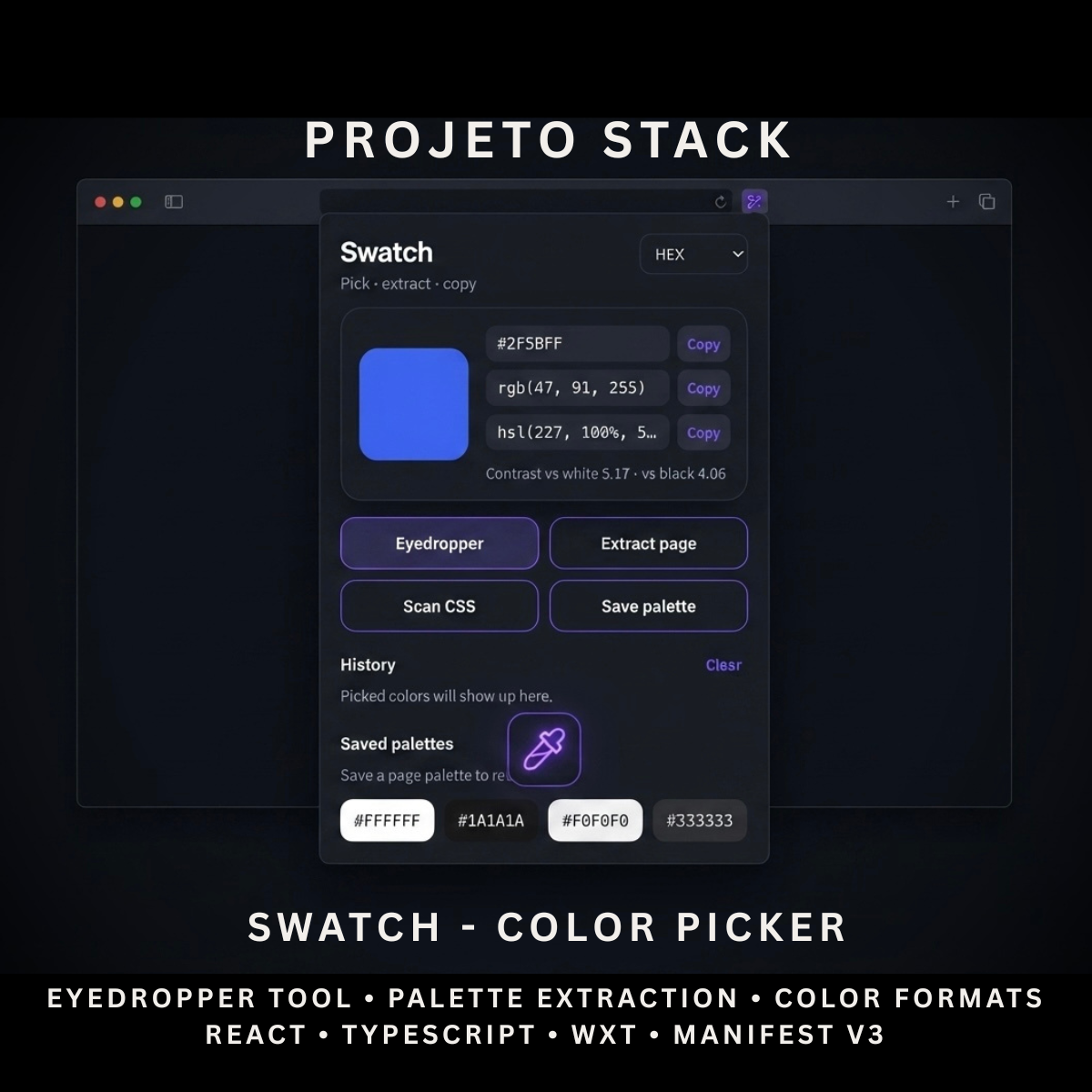
Swatch is a premium React and TypeScript colour picker extension featuring a native EyeDropper, visible-page palette extraction, CSS colour scanning, contrast analysis, colour history, and saved palettes. It provides a complete source-code foundation for design tools, developer utilities, branding applications, and client extension projects.
Perfect For
✓ Web Designers
✓ UI & UX Designers
✓ Frontend Developers
✓ Graphic Designers
✓ Brand Designers
✓ Design Agencies
✓ Creative Professionals
✓ Website Auditing Tools
✓ Browser Productivity Products
✓ Agency Client Projects
Why Choose Swatch?
✓ Native browser EyeDropper tool
✓ Extract dominant colours from visible webpages
✓ Scan colours used in webpage styles
✓ Copy HEX, RGB, and HSL values
✓ Built-in colour contrast analysis
✓ Automatic colour history
✓ Save and reload custom palettes
✓ Local browser storage
✓ No external colour-processing service
✓ Lightweight browser permissions
✓ Clean and organised source code
✓ Easy to customise and extend
✓ No recurring subscription fees
What’s Included
Your download includes:
📦 Complete React & TypeScript Source Code
📦 Chrome Manifest V3 Production Build
📦 Microsoft Edge-Compatible Build
📦 Colour Picker Popup Interface
📦 Native EyeDropper Tool
📦 Visible Page Palette Extractor
📦 CSS Colour Scanner
📦 Colour Conversion Utilities
📦 Contrast Ratio Calculator
📦 Colour History System
📦 Saved Palette Management
📦 Copy Format Preferences
📦 Background Service Worker
📦 Browser Storage System
📦 Extension Icons & Assets
📦 WXT Configuration
📦 TypeScript Configuration
📦 Package Configuration
📄 Documentation (README.md)
Key Features
✓ Native EyeDropper Colour Picker
✓ Visible Page Palette Extraction
✓ Median-Cut-Style Colour Analysis
✓ CSS Colour Scanning
✓ HEX Colour Values
✓ HEX Values Without Hash Symbol
✓ RGB Colour Values
✓ HSL Colour Values
✓ One-Click Colour Copying
✓ Configurable Default Copy Format
✓ Contrast Ratio Against White
✓ Contrast Ratio Against Black
✓ Automatic Colour History
✓ Duplicate Colour Prevention
✓ Saved Colour Palettes
✓ Load Saved Palettes
✓ Delete Saved Palettes
✓ Copy Complete Extracted Palette
✓ Local Browser Storage
✓ Lightweight Manifest V3 Permissions
Technology Stack
Built using modern browser-extension technologies:
✓ React 19
✓ TypeScript
✓ WXT
✓ Manifest V3
✓ Browser EyeDropper API
✓ Browser Storage API
✓ Browser Scripting API
✓ Visible Tab Capture API
✓ Offscreen Canvas
✓ ImageData Processing
✓ Component-Based Architecture
✓ Modern CSS
✓ Modern Folder Structure
Performance Features
Designed for fast colour-selection workflows:
✓ Local Colour Processing
✓ No External Processing Server
✓ Lightweight Popup Interface
✓ Downscaled Screenshot Analysis
✓ Sampled Pixel Processing
✓ Near-Duplicate Colour Filtering
✓ Limited DOM Scanning
✓ Local History Storage
✓ Local Palette Storage
✓ Fast Client-Side Colour Conversion
✓ Reusable React Components
✓ Clean TypeScript Implementation
✓ Modern Manifest V3 Architecture
✓ Easy Branding Customisation
✓ Scalable Source-Code Structure
How It Works
- Download and extract the project files.
- Install the project dependencies.
- Run the development environment or generate a production build.
- Load the generated Chrome extension folder into your browser.
- Open Swatch from the browser toolbar.
- Use the EyeDropper to select any visible colour.
- Extract a palette from the visible webpage or scan its CSS colours.
- Copy colours in HEX, RGB, HSL, or bare HEX format.
- Save useful palettes and return to recently selected colours.
- Customise the branding, interface, icons, palette limits, and functionality.
- Build and publish the completed extension when ready.
Browser Compatibility
Works with:
✓ Google Chrome
✓ Microsoft Edge
✓ Brave
✓ Opera
Compatibility with other Chromium-based browsers depends on their support for the required browser APIs and should be tested before production use.
License
Your purchase includes:
✓ Lifetime access to the purchased source code
✓ Commercial use for personal and client projects
✓ Full customisation rights
✓ Unlimited personal and client projects
You may not:
✗ Resell the original source code
✗ Redistribute the files
✗ Share the files publicly
✗ Repackage the source code as a competing digital product for resale
Instant Digital Download
No physical product will be shipped.
Immediately after purchase, you’ll receive instant access to download the complete colour-picker source code, production build, and documentation so you can begin creating your own browser design tool.
Important Note
The EyeDropper feature requires a browser that supports the native EyeDropper API.
Visible-page palette extraction analyses the portion of the webpage currently displayed in the browser. CSS scanning reviews supported computed colour properties from a limited number of webpage elements.
The product does not guarantee extraction of:
✗ Every Colour From Extremely Large Webpages
✗ Complex CSS Gradients
✗ Background Images
✗ Every CSS Custom Property
✗ Colours Inside Restricted Browser Pages
✗ Content Inside Inaccessible Cross-Origin Frames
Browser settings pages, extension stores, internal browser URLs, and other restricted pages may prevent screenshot capture or webpage scanning.
PROJETO STACK - Premium software templates and digital products built for modern businesses.
Share