PROJETO STACK
Trace - Screenshot, Annotator & Screen Recorder
Trace - Screenshot, Annotator & Screen Recorder
Couldn't load pickup availability
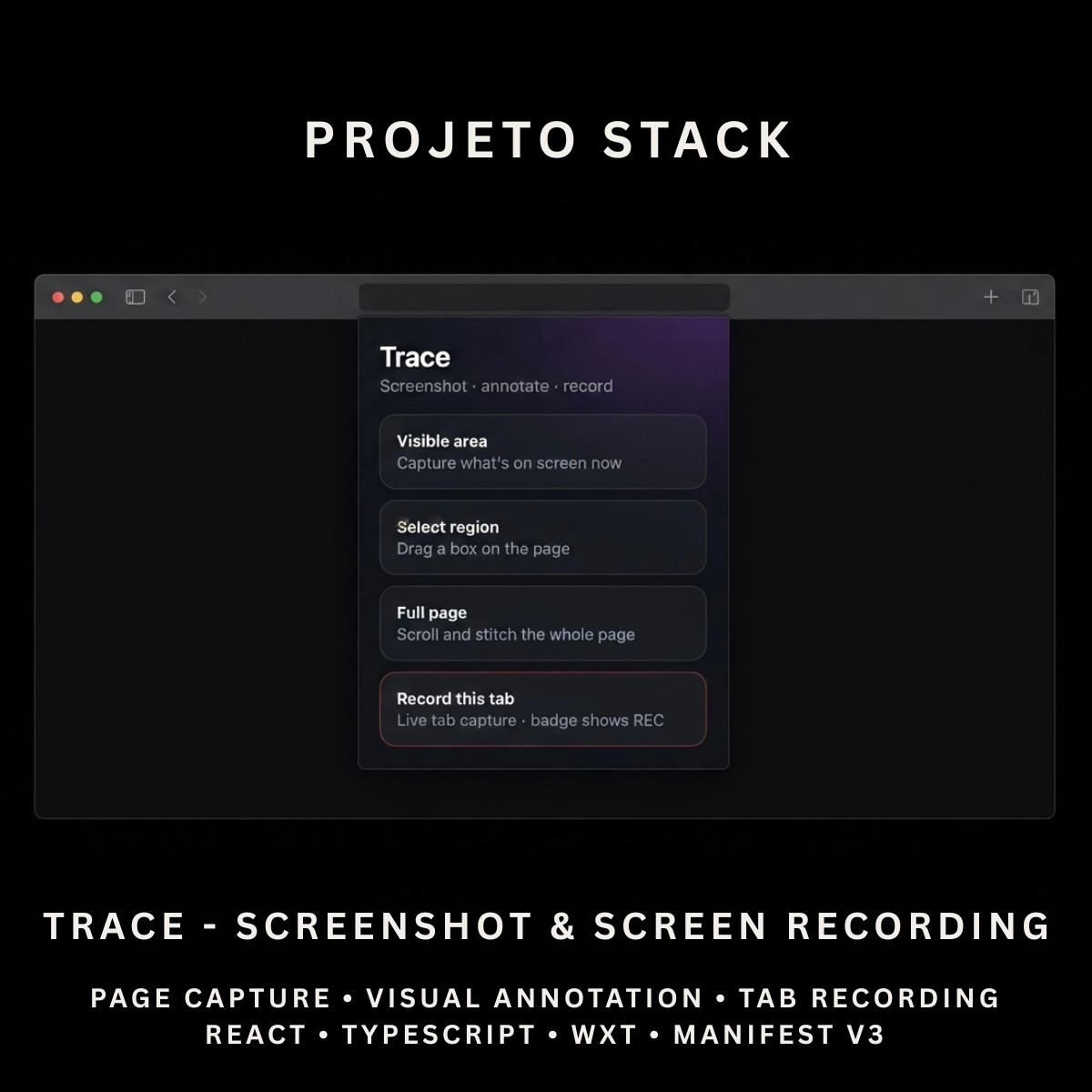
Capture webpages, annotate screenshots, and record the current browser tab from one modern extension.
Trace is a React and TypeScript screenshot tool with visible-area, region and full-page capture, annotation tools, PNG downloads and WebM tab recording. It provides a complete source-code foundation for feedback tools, design utilities, QA workflows and client extension projects.
Perfect For
✓ Web Designers
✓ UI & UX Designers
✓ Frontend Developers
✓ QA Testers
✓ Software Teams
✓ Technical Support Teams
✓ Content Creators
✓ Website Auditing Tools
✓ Browser Productivity Products
✓ Agency Client Projects
Why Choose Trace?
✓ Capture the visible browser area
✓ Select and capture custom webpage regions
✓ Create full-page screenshots
✓ Annotate screenshots inside a dedicated editor
✓ Add pen, rectangle, arrow and text annotations
✓ Highlight important webpage areas
✓ Blur sensitive screenshot regions
✓ Adjust annotation colours and stroke width
✓ Download completed screenshots as PNG files
✓ Record the current browser tab as WebM
✓ Process captures locally inside the browser
✓ Complete editable source code
✓ Easy to customise and extend
✓ No recurring subscription fees
What’s Included
Your download includes:
📦 Complete React & TypeScript Source Code
📦 Chrome Manifest V3 Production Build
📦 Screenshot Capture Popup
📦 Dedicated Annotation Editor
📦 Visible-Area Capture
📦 Region-Selection Capture
📦 Full-Page Capture
📦 Screenshot Stitching System
📦 Current-Tab Recording
📦 WebM Recording Export
📦 Recording Status Badge
📦 Recording Notifications
📦 Pen Annotation Tool
📦 Rectangle Annotation Tool
📦 Arrow Annotation Tool
📦 Highlight Annotation Tool
📦 Text Annotation Tool
📦 Blur Annotation Tool
📦 Annotation Colour Controls
📦 Adjustable Stroke Width
📦 Undo Action
📦 Clear Annotations Action
📦 Discard Capture Action
📦 PNG Download
📦 Temporary Capture Storage
📦 Background Service Worker
📦 Runtime Content Script
📦 Offscreen Recording Page
📦 Extension Icons & Assets
📦 WXT Configuration
📦 TypeScript Configuration
📦 Package Configuration
📄 Documentation (README.md)
Key Features
✓ Visible Browser-Area Capture
✓ Custom Region Capture
✓ Full-Page Screenshot Capture
✓ Automatic Page Scrolling
✓ Vertical Screenshot Stitching
✓ Original Scroll-Position Restoration
✓ Dedicated Screenshot Editor
✓ Freehand Drawing
✓ Rectangle Outlines
✓ Arrow Annotations
✓ Highlighted Areas
✓ Text Annotations
✓ Pixelated Blur Areas
✓ Six Annotation Colours
✓ Adjustable Stroke Width
✓ Undo Annotation Changes
✓ Clear All Annotations
✓ Discard Stored Capture
✓ PNG Image Download
✓ Page Title Display
✓ Reliable Screenshot Retry System
✓ PNG Capture
✓ JPEG Capture Fallback
✓ Current Tab Video Recording
✓ WebM Video Export
✓ Automatic Recording Filenames
✓ Recording Status Badge
✓ Recording Completion Notifications
✓ Local Browser Processing
Technology Stack
Built using modern browser-extension technologies:
✓ React 19
✓ TypeScript
✓ WXT
✓ Manifest V3
✓ Canvas API
✓ OffscreenCanvas
✓ Browser Tabs API
✓ Browser Scripting API
✓ Browser Storage API
✓ Browser Downloads API
✓ Browser Notifications API
✓ Chrome Tab Capture API
✓ Chrome Offscreen Document API
✓ MediaRecorder API
✓ Shadow Page Content Overlay
✓ Component-Based Architecture
✓ Modern CSS
✓ Modern Folder Structure
Performance Features
Designed for responsive screenshot workflows:
✓ Local Screenshot Processing
✓ No External Image-Processing Server
✓ Reliable Capture Retry System
✓ JPEG Fallback for Capture Errors
✓ Device-Pixel-Aware Region Cropping
✓ Client-Side Image Stitching
✓ Overlap-Based Full-Page Assembly
✓ Maximum Full-Page Capture Guard
✓ Temporary Local Capture Storage
✓ Local Annotation Rendering
✓ Local WebM Recording
✓ Automatic Unique Filenames
✓ Reusable React Components
✓ Clean TypeScript Implementation
✓ Modern Manifest V3 Architecture
✓ Easy Branding Customisation
✓ Scalable Source-Code Structure
How It Works
- Download and extract the project files.
- Install the project dependencies.
- Run the development environment or generate a production build.
- Load the generated Chrome extension folder into your browser.
- Open the webpage you want to capture.
- Open Trace from the browser toolbar.
- Choose Visible Area, Select Region or Full Page.
- Add annotations inside the dedicated editor.
- Adjust the annotation colour and stroke size.
- Download the completed screenshot as a PNG file.
- Choose Record This Tab to start a WebM screen recording.
- Open Trace again and select Stop & Save Recording.
- Customise the branding, tools, colours, icons and functionality.
- Build and publish the completed extension when ready.
Browser Compatibility
Verified for:
✓ Google Chrome
Compatibility may be possible after testing with:
✓ Microsoft Edge
✓ Brave
✓ Opera
Firefox and Safari compatibility are not included or verified in the uploaded package.
License
Your purchase includes:
✓ Lifetime access to the purchased source code
✓ Commercial use for personal and client projects
✓ Full customisation rights
✓ Unlimited personal and client projects
You may not:
✗ Resell the original source code
✗ Redistribute the files
✗ Share the files publicly
✗ Repackage the source code as a competing digital product for resale
Instant Digital Download
No physical product will be shipped.
Immediately after purchase, you’ll receive access to download the complete screenshot and annotation source code, Chrome production build and documentation so you can begin creating your own browser capture tool.
Important Note
Trace captures and processes screenshots locally inside the browser.
Full-page capture works by scrolling through the webpage and stitching multiple visible screenshots together. Results may vary on pages containing:
✗ Sticky or Fixed Elements
✗ Infinite Scrolling
✗ Lazy-Loaded Content
✗ Scroll-Based Animations
✗ Embedded Cross-Origin Frames
✗ Extremely Long Pages
The full-page process is limited to a maximum of 60 captured sections.
Tab recording:
✓ Records the current browser tab as WebM video
✗ Does Not Record Microphone Audio
✗ Does Not Record Tab Audio
✗ Does Not Record a Webcam
✗ Does Not Export MP4 Video
Trace may not operate on restricted browser pages such as browser settings, extension marketplaces, internal browser URLs and some built-in document viewers.
PROJETO STACK - Premium software templates and digital products built for modern businesses.
Share